目次
この記事について
Phase 2-7で、STP(PVST+)は、リンク障害から迂回路に切り替わるのに約30秒かかることを測った。RSTP(Rapid Spanning Tree Protocol)は、これを1秒以内に縮める高速版と説明される。この記事では、同じ構成・同じ操作で測って、STPと比べた。
結論を先に書くと、そのままRSTPにしても、約30秒のまま変わらなかった。速くなるのは、PCをつなぐポートにPortFastを設定したときだけだった。
- モードをrapid-pvstに変更し、ポートの種類(Type)を確認する
- 2-7と同じ切断・復旧の操作で、不通時間を測る(RSTPのみ)
- 約30秒のままだった原因を、ポートの状態の変化から突き止める
- PortFastを設定して再測定する
- 一部のスイッチだけ旧STPの「混在構成」の挙動
1. 検証環境
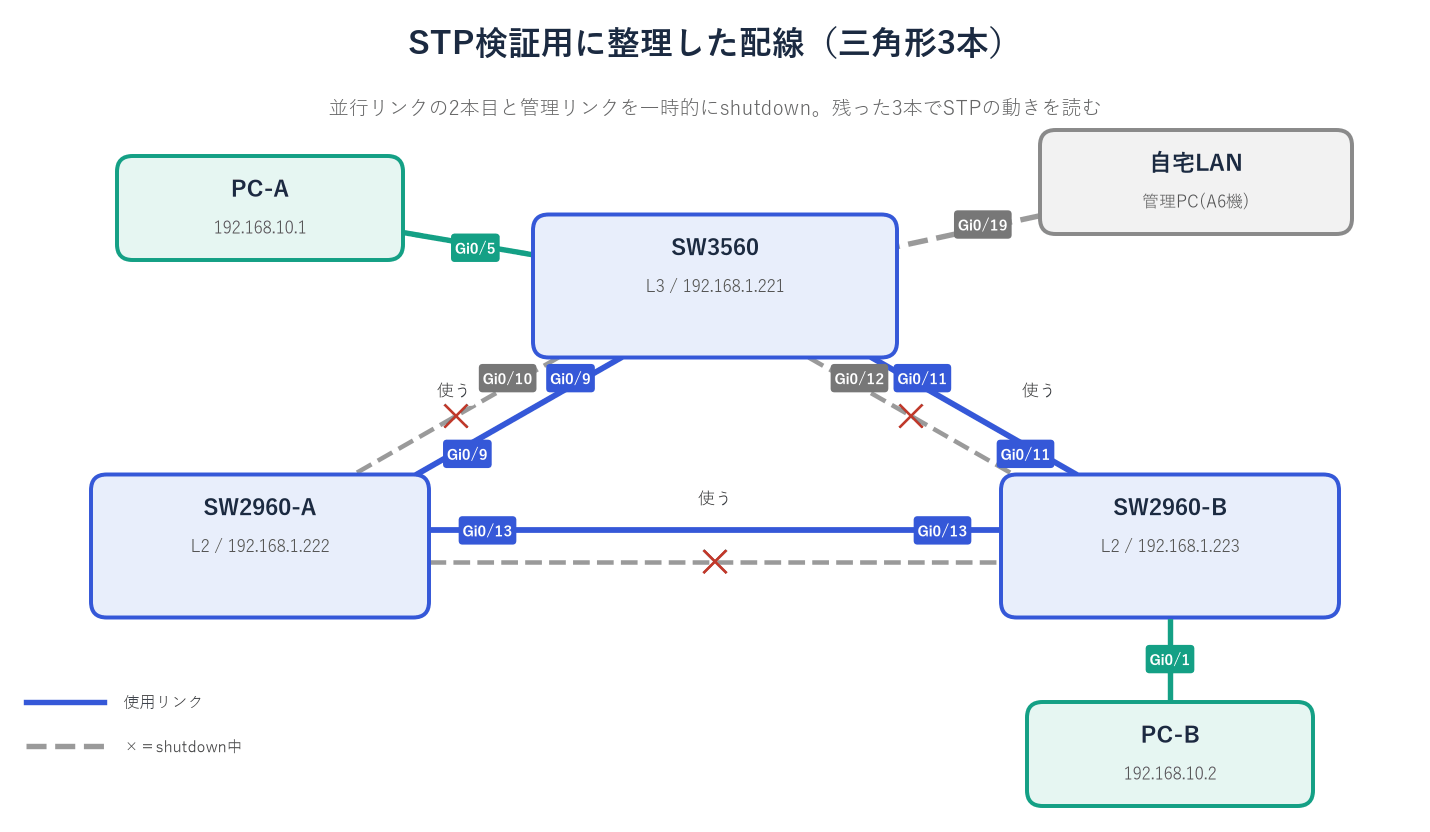
2-7と同じ構成。VLAN10のルートはSW3560(priority 24576)、PC-AはSW3560 Gi0/5、PC-BはSW2960-B Gi0/1。SW3560とSW2960-Bをつなぐ Gi0/11 のリンクをshutdown/no shutdownして、PC-AからPC-Bへの通信が途切れた時間を、PC-Aの測定スクリプト(100ミリ秒ごとにping)で記録した。
測定の方法
PC-AからPC-B(192.168.10.2)へ、100ミリ秒ごとにpingを送るPowerShellのスクリプトを動かし、返事が来なくなった時刻(LOST)と、戻った時刻・途切れた時間(RECOVERED outage)を記録した。100ミリ秒より短い途切れは検出できない。スイッチの操作(shutdown/no shutdown など)の時刻と、LOSTの時刻を見比べて、どの操作による途切れかを判断している。スクリプトの全文と、1行ごとの説明は、Phase 2-7(STP/PVST+)の「切り替え時間の実測」に載せている。
2. そもそもRSTPとは何か
| 項目 | PVST+(STP) | Rapid PVST+(RSTP) |
|---|---|---|
| ポートの状態 | Blocking/Listening/Learning/Forwarding | Discarding/Learning/Forwarding |
| 切り替えの仕組み | タイマーを待つ(Listening 15秒+Learning 15秒) | 隣のスイッチと「提案(Proposal)」「合意(Agreement)」をやり取りして、すぐ切り替える |
| ポートの役割 | ルート/指定/ブロック | ルート/指定/Alternate(代替)/Backup |
| 切り替え時間の目安 | 約30〜50秒 | 1秒未満〜数秒 |
ポイント
RSTPの「提案と合意」は、スイッチ同士のリンクでしか成立しない。PCは合意を返せないので、PCにつながるポートは、「エッジポート」(PortFast)として別に指定しておく必要がある。エッジポートに指定しないと、そのポートはタイマー待ち(約30秒)に戻ってしまう。
3. モード変更とポートの種類
SW3560(config)# spanning-tree mode rapid-pvst ← STPのモードを、高速版のRapid PVST+(RSTP)にする
SW2960-A(config)# spanning-tree mode rapid-pvst ← 同じく、SW2960-Aもrapid-pvstにする
SW2960-B(config)# spanning-tree mode rapid-pvst ← 同じく、SW2960-Bもrapid-pvstにする
設定全体を見る(この設定の後の SW3560)
version 12.2no service padservice timestamps debug datetime msecservice timestamps log datetime msecno service password-encryption!hostname SW3560!boot-start-markerboot-end-marker!logging buffered 16384enable secret 5 <ハッシュ・非表示>!no aaa new-modelsystem mtu routing 1500vtp domain LABvtp mode transparentip subnet-zero!spanning-tree mode rapid-pvstspanning-tree extend system-idspanning-tree vlan 10 priority 24576spanning-tree vlan 20 priority 28672!vlan internal allocation policy ascending!vlan 10 name TEST-A!vlan 20 name TEST-B!vlan 30 name TEST-C!vlan 99 name NATIVE-TEST!interface GigabitEthernet0/5 description VLAN-Test-PC-A switchport access vlan 10 switchport mode access!interface GigabitEthernet0/9 description Trunk-to-SW2960A switchport trunk encapsulation dot1q switchport trunk allowed vlan 1,10,20,30,99 switchport mode trunk switchport nonegotiate!interface GigabitEthernet0/10 description Trunk-to-SW2960A switchport trunk encapsulation dot1q switchport trunk allowed vlan 1,10,20,30,99 switchport mode trunk switchport nonegotiate shutdown!interface GigabitEthernet0/11 description Trunk-to-SW2960B switchport trunk encapsulation dot1q switchport trunk allowed vlan 1,10,20,30,99 switchport mode trunk switchport nonegotiate!interface GigabitEthernet0/12 description Trunk-to-SW2960B switchport trunk encapsulation dot1q switchport trunk allowed vlan 1,10,20,30,99 switchport mode trunk switchport nonegotiate shutdown!interface GigabitEthernet0/19 description Link-to-HomeLAN-Mgmt switchport mode access!interface GigabitEthernet0/20 switchport mode access!interface GigabitEthernet0/21 description Mgmt-to-SW2960A switchport mode access!interface GigabitEthernet0/22 switchport mode access!interface GigabitEthernet0/23 description Mgmt-to-SW2960B switchport mode access!interface GigabitEthernet0/24 switchport mode access!interface Vlan1 ip address 192.168.1.221 255.255.255.0!ip classlessip http server!control-plane!line con 0 password <テスト用パスワード> loginline vty 0 4 password <テスト用パスワード> login transport input telnetline vty 5 15 password <テスト用パスワード> login transport input telnet!end設定のないインタフェース(17個)は省略している。
SW2960-A・SW2960-Bの設定にも、同じ「spanning-tree mode rapid-pvst」の行が入る。この設定全体は、この記事の検証をすべて終えた後の設定ファイルである。
変更後、3台とも show spanning-tree summary で Switch is in rapid-pvst mode と表示された。show spanning-tree vlan 10 では、ポートの Type が P2p(point-to-point、スイッチ同士の1対1のリンク)になった。自宅LANにつながるGi0/19も、P2pだった。
VLAN0010
  Spanning tree enabled protocol rstp
Interface        Role Sts Cost      Prio.Nbr Type
---------------- ---- --- --------- -------- --------------------------------
Gi0/1            Desg FWD 19        128.1    Edge P2p
Gi0/11           Root FWD 4         128.11   P2p
Gi0/13           Altn BLK 4         128.13   P2p
ポートの役割に Altn(Alternate=代替)が表示される。STPでは単に「ブロック」だったポートが、RSTPでは「ルートポートが使えなくなったときの代わり」として区別される。(上の表示は、PortFastを設定した後のもの。Gi0/1が Edge になっている。)
実機で分かった点
モードの変更中に、PC-A⇔PC-Bの通信が約30秒途切れた(SW3560を変更したとき、SW2960-A・Bを変更したときの2回)。STPの再計算が起きるためで、業務中のネットワークでは、作業時間帯を選ぶ必要がある。
4. 切り替え時間の実測(そのままRSTPにした場合)
2-7と同じ操作(SW3560 Gi0/11 のshutdown/no shutdown)を、3回ずつ行った。
| 回 | 切断(shutdown)時 | 復旧(no shutdown)時 |
|---|---|---|
| 1 | 31,098 ms | 29,618 ms |
| 2 | 30,115 ms | 30,113 ms |
| 3 | 30,604 ms | 30,118 ms |
| 平均 | 約30.6秒 | 約30.0秒 |
想定と違った結果
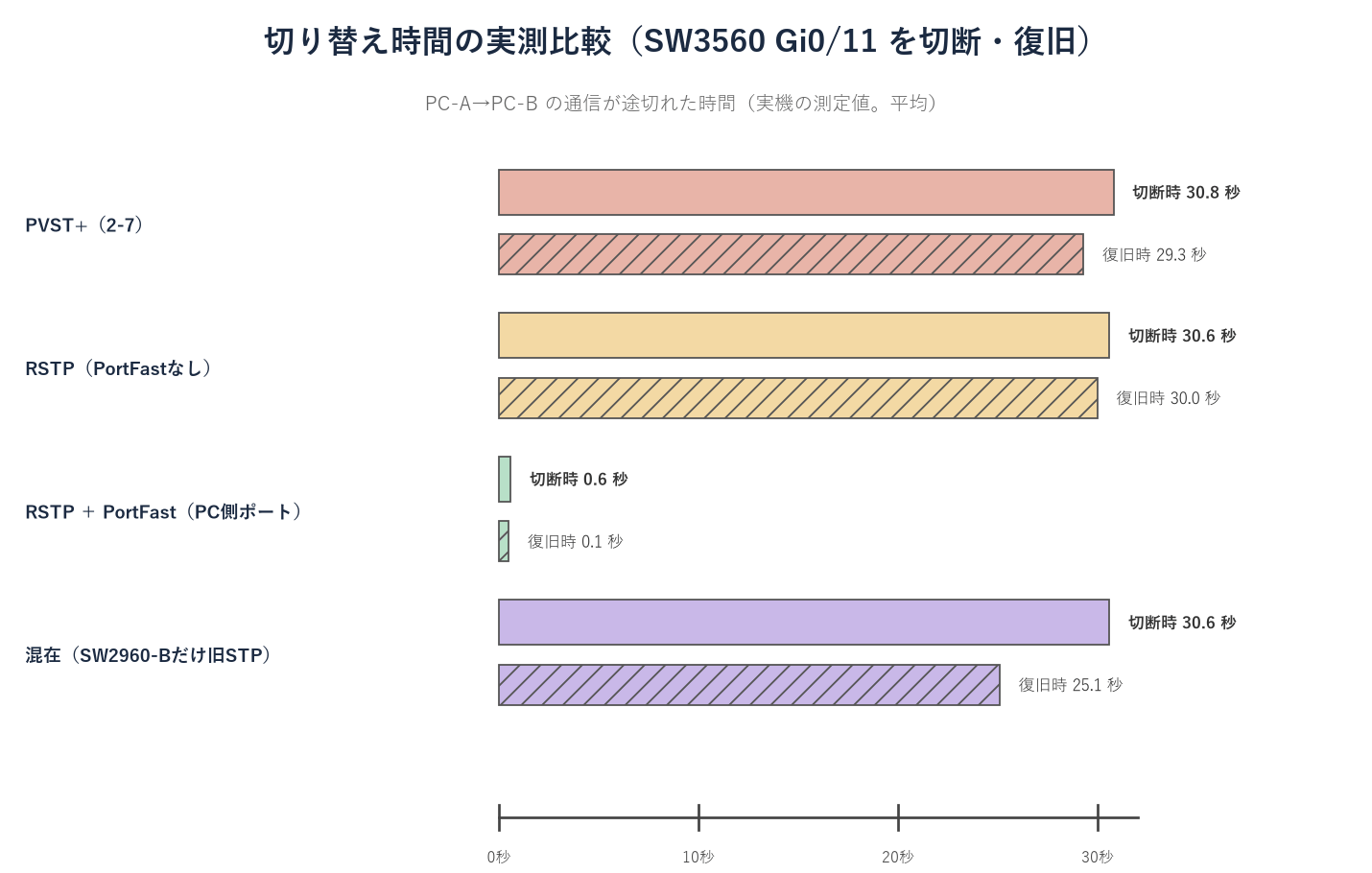
RSTPの期待値は1秒未満だったが、結果は、PVST+(切断 約30.8秒、復旧 約29.3秒)と、ほとんど変わらなかった。
5. なぜ約30秒のままだったのか
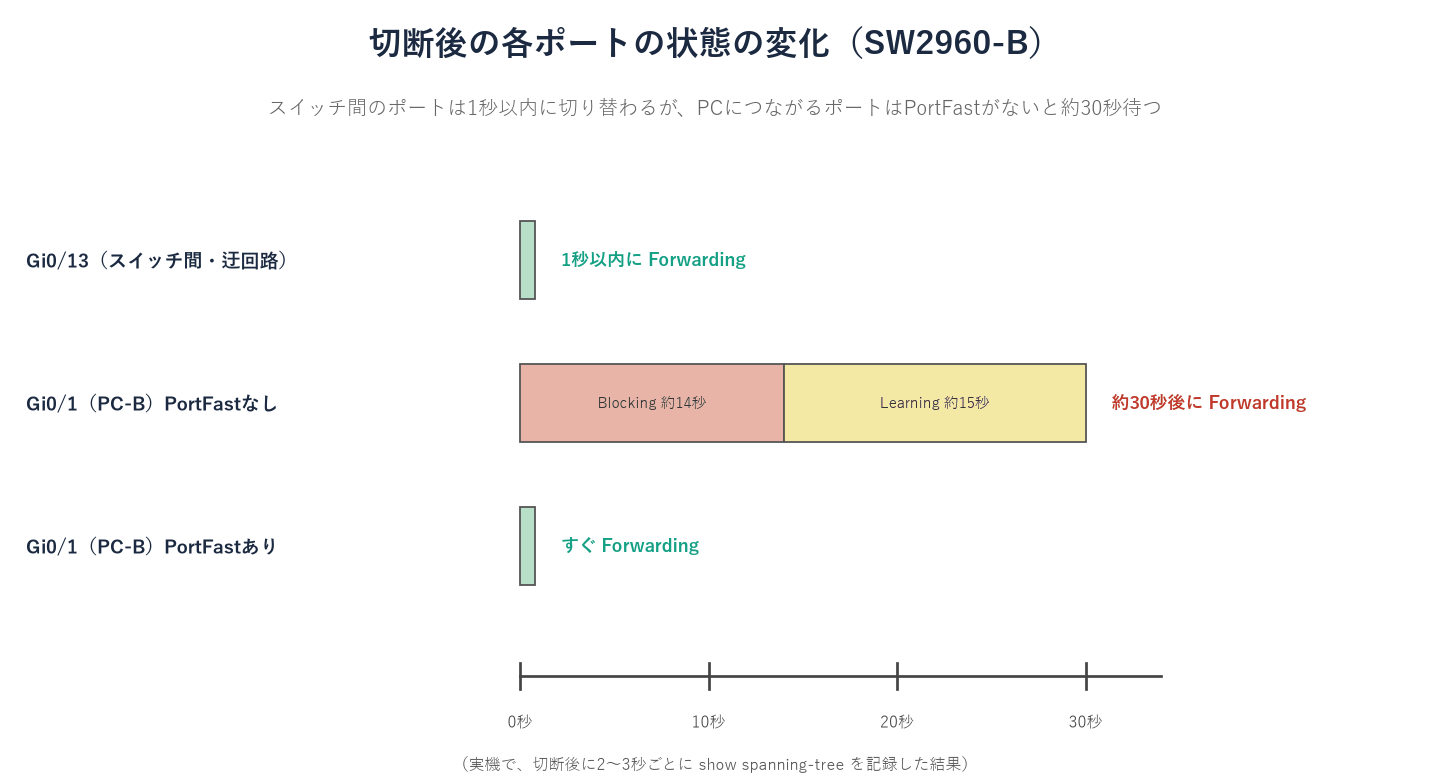
切断した直後から、SW2960-Bのポートの状態を、2〜3秒ごとに記録した。
| 切断後の経過 | Gi0/13(スイッチ間・迂回路) | Gi0/1(PC-Bにつながるポート) |
|---|---|---|
| +1秒 | Root FWD(すぐに転送) | Desg BLK(止まっている) |
| +15秒 | Root FWD | Desg LRN(Learning) |
| +32秒 | Root FWD | Desg FWD(転送再開) |
スイッチ間のポートは、RSTPの高速な切り替えで、1秒以内に転送を始めていた。ところが、PC-Bにつながる Gi0/1 は、通常のポートなので、新しいルートポートの決定に合わせて、いったん止まり、PCから合意が返ってこないため、旧STPと同じタイマー(約30秒)で復帰していた。PC-Bへの通信が約30秒途切れたのは、このポートのせいだった。
6. PortFastを設定して再測定
SW2960-B(config)# interface GigabitEthernet0/1 ← PC-Bをつなぐポートの設定モードに入る
SW2960-B(config-if)# spanning-tree portfast ← このポートを「エッジポート」(PCだけがつながるポート)にする
設定全体を見る(この設定の後の SW2960-B)
version 12.2no service padservice timestamps debug datetime msecservice timestamps log datetime msecno service password-encryption!hostname SW2960-B!logging buffered 16384 debuggingenable secret 5 <ハッシュ・非表示>!no aaa new-modelvtp domain LABvtp mode transparentip subnet-zero!no file verify auto!spanning-tree mode rapid-pvstspanning-tree extend system-id!vlan internal allocation policy ascending!vlan 10 name TEST-A!vlan 20 name TEST-B!vlan 30 name TEST-C!vlan 99 name NATIVE-TEST!interface GigabitEthernet0/1 description VLAN-Test-PC-B switchport access vlan 10 switchport mode access spanning-tree portfast!interface GigabitEthernet0/11 description Trunk-to-SW3560 switchport trunk allowed vlan 1,10,20,30,99 switchport mode trunk switchport nonegotiate!interface GigabitEthernet0/12 description Trunk-to-SW3560 switchport trunk allowed vlan 1,10,20,30,99 switchport mode trunk switchport nonegotiate!interface GigabitEthernet0/13 description Trunk-to-SW2960A switchport trunk allowed vlan 1,10,20,30,99 switchport mode trunk switchport nonegotiate!interface GigabitEthernet0/14 description Trunk-to-SW2960A switchport trunk allowed vlan 1,10,20,30,99 switchport mode trunk switchport nonegotiate shutdown!interface GigabitEthernet0/19 description Mgmt-to-SW3560 switchport mode access!interface Vlan1 ip address 192.168.1.223 255.255.255.0 no ip route-cache!ip http server!control-plane!banner motd ^C*** Cisco Catalyst Lab / SW2960-B ***This device is for lab testing only. Unauthorized access is prohibited.^C!line con 0 password <テスト用パスワード> loginline vty 0 4 password <テスト用パスワード> login transport input telnetline vty 5 15 password <テスト用パスワード> login transport input telnet!end設定のないインタフェース(18個)は省略している。
この設定全体は、この記事の検証をすべて終えた後の設定ファイルである。
PortFastを設定すると、そのポートは「エッジポート」(PCなどの端末だけがつながる)として扱われ、切り替えの待ちを受けなくなる。show spanning-tree vlan 10 の Type が Edge P2p になることを確認して、再測定した。
| 回 | 切断(shutdown)時 | 復旧(no shutdown)時 |
|---|---|---|
| 1 | 1,119 ms | 115 ms |
| 2 | 600 ms | 検出なし(100ミリ秒未満) |
| 3 | 123 ms | 115 ms |
| 平均 | 約0.6秒 | 約0.1秒以下 |
この記事の結論
PortFastを設定するだけで、不通は約30秒から1秒前後に縮んだ。「RSTPにすれば速い」ではなく、「RSTPにして、PCをつなぐポートをPortFastにすれば速い」が正しい理解である。
7. 混在構成(一部だけ旧STP)
SW2960-Bだけを、旧STP(pvst)に戻して確認した。
SW2960-B(config)# spanning-tree mode pvst ← SW2960-Bだけ、旧STP(PVST+)に戻す| スイッチ | ポート | Type |
|---|---|---|
| SW3560 | Gi0/11(SW2960-Bにつながる) | P2p Peer(STP) |
| SW2960-A | Gi0/13(SW2960-Bにつながる) | P2p Peer(STP) |
| SW3560 | Gi0/9(SW2960-A、RSTP同士) | P2p(変わらず) |
RSTPのスイッチは、旧STPの相手を検知して、そのポートだけ旧STPの動作(Peer(STP))に切り替える。RSTP同士のポートは、そのままだった。
| 操作 | 不通時間 |
|---|---|
| SW2960-Bをpvstに変更 | 30,629 ms |
| 混在での切断 | 30,602 ms |
| 混在での復旧 | 25,104 ms |
| SW2960-Bをrapid-pvstに戻す | 113 ms |
PortFastを設定していても、旧STPのスイッチが入っていると、切り替えは約30秒に戻った。全台をRSTPに戻すと、113 msに戻った。高速化するには、リンクでつながる全てのスイッチが、RSTPで動く必要がある。
8. 実機でしか分からない点・つまずきポイント
- モードをrapid-pvstにするだけでは、PCへの通信の切り替えは速くならない(約30秒のまま)。
- PCをつなぐポートは、PortFast(エッジポート)に指定して初めて、RSTPの高速化が効く。
- スイッチ間のポートは、RSTPで1秒以内に切り替わる。遅いのは、エッジポートに指定していないPC側のポートだった。
- 旧STPのスイッチが1台でも混ざると、そのスイッチにつながるポートは Peer(STP) になり、約30秒の切り替えに戻る。
- モードの変更そのもので、STPの再計算が起きて、約30秒の不通が2回起きた。
9. まとめ
RSTPの高速化は、モードを変えるだけでは働かなかった。PCをつなぐポートにPortFastを設定して、初めて、切り替えが1秒前後に縮んだ。次はPhase 2-9として、PortFastを含めた保護機能(BPDU Guard・Root Guard・Loop Guard・UplinkFast・BackboneFast)を扱う。